
We wanted more than a slide deck.
Oracle Enterprise Command Centers are easiest to understand when people can see them working. Not as a diagram. Not as a roadmap. Working.
That was the goal behind our ECC / Vision implementation: build a live Oracle E-Business Suite Vision environment on Oracle Cloud Infrastructure, load Enterprise Command Center data, validate the dashboards, and turn the result into something clients can actually walk through.
The outcome is now live as part of our Oracle EBS Command Center offering: Oracle EBS Analytics, Already Running.
Why ECC matters for EBS customers
Many Oracle EBS teams have years of valuable operational data, but the work of turning that data into useful visibility often becomes a separate BI project. Enterprise Command Centers change that conversation. They bring role-based analytics directly into the EBS experience, connected to the business processes people already use.
That means teams can explore exceptions, trends, transactions, work queues, inventory signals, financial activity, assets, projects, procurement, service, and more without starting from a blank reporting canvas.
How we built the Vision ECC environment on OCI
We built the environment on Oracle Cloud Infrastructure using an EBS 12.2.13 Vision footprint with the ECC framework layered in. The implementation combined traditional Oracle infrastructure work with cloud-native automation and an internal AI-assisted operating model.
OCI CLI was central to the work. We used it to inspect and validate cloud resources, confirm instance state, check load balancer routing, review supporting infrastructure, and keep the environment work grounded in current, verifiable facts instead of stale notes.
From there, the work moved through the familiar Oracle path: application access, database verification, ECC framework review, concurrent request history, product data loads, and dashboard validation. The point was not just to install software. The point was to prove what was actually running, what was loaded, and what could be shown responsibly.
Where our AI CXO system helped
Behind the scenes, we used our custom AI CXO system to coordinate the work across roles: infrastructure review, Oracle application verification, implementation notes, marketing translation, and client-facing packaging.
That matters because an ECC project is not only technical. It has to become a business conversation. Someone has to validate the environment. Someone has to understand the Oracle modules. Someone has to separate demo-ready facts from internal remediation items. Someone has to turn all of that into clear client language.
Our AI CXO system helped us move faster without blurring those lines. The infrastructure facts stayed infrastructure facts. The Oracle findings stayed Oracle findings. The marketing message became a truthful translation of what the system could demonstrate.
What the demo shows
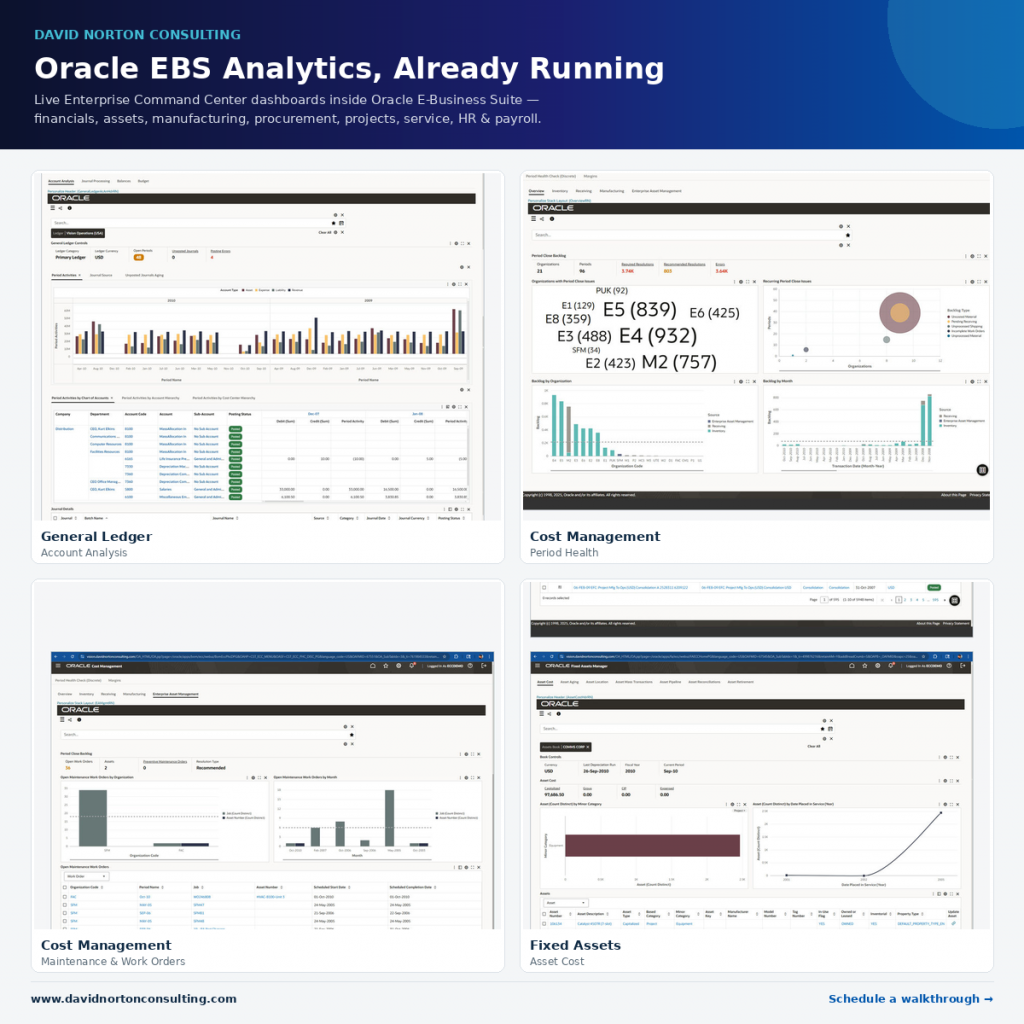
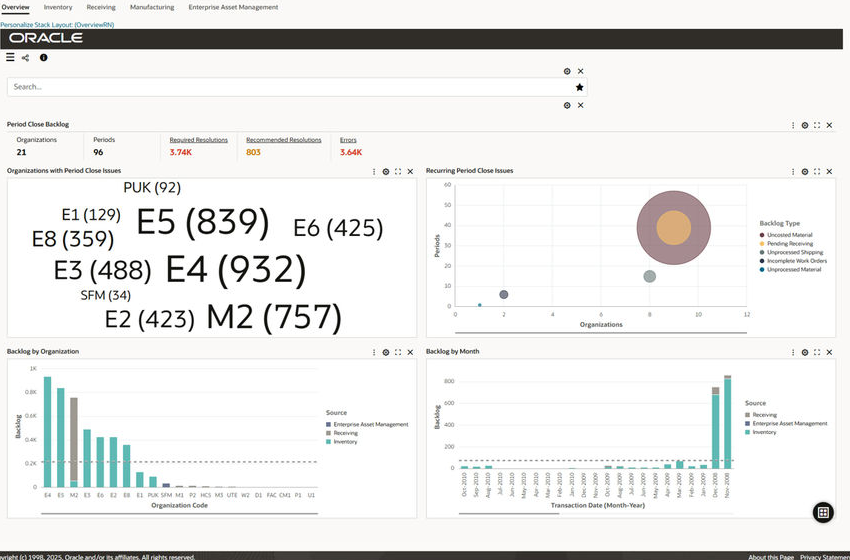
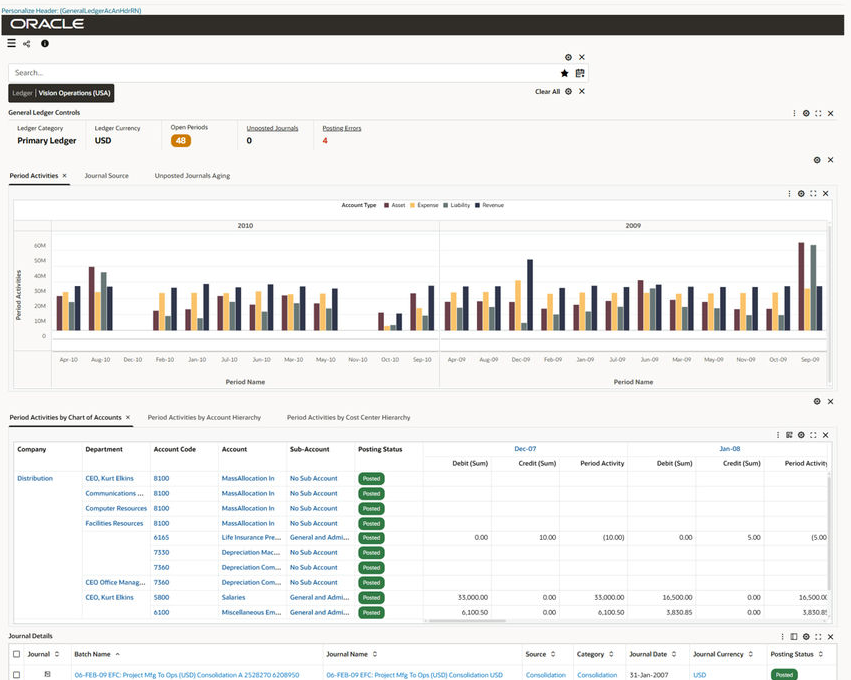
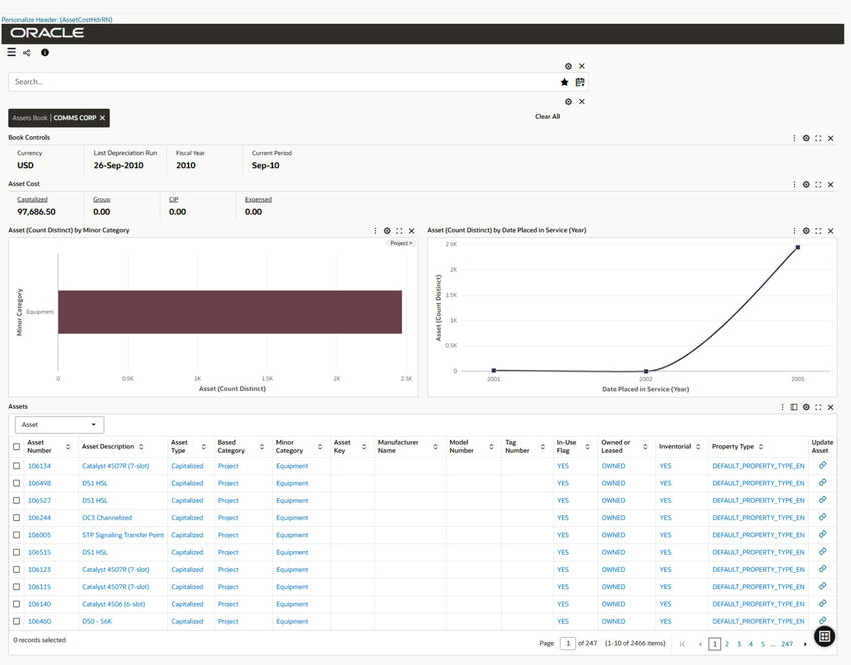
The current demo includes working examples across areas such as General Ledger, Cost Management, and Fixed Assets, with a broader Oracle EBS Command Center catalog available for implementation planning.
Extend ECC with customer-specific data
The offering is not limited to standard dashboards. ECC can also be extended with customer-specific data sets, allowing organizations to combine EBS operational data with supplemental data from other systems, spreadsheets, integrations, or legacy sources through designed load processes and security-aware dashboard components.
The practical offer
For EBS customers, the next step does not need to be a massive transformation program. A practical ECC path can start with a walkthrough, then move into a focused pilot around one product area, one operational problem, or one executive visibility need.
- Guided demo / discovery session — see live dashboards and identify fit.
- Single Command Center pilot — configure one product area against client-specific goals.
- Multi-product rollout — phase coverage across the EBS footprint.
- Custom data set and dashboard extension — bring non-EBS or supplemental data into ECC-style analytics.
- Managed hosting and support — keep the environment supported, refreshed, and useful.
See Oracle EBS analytics already running
If your team is running Oracle E-Business Suite and wants better operational visibility without starting from a custom BI build, this is the right conversation.
Explore the ECC offering and schedule a walkthrough:
https://www.davidnortonconsulting.com/oracle-ebs-enterprise-command-centers/